Updates arrive without being asked for. Our IT experts check every product for updates, and when the 070-482日本語 exam bank is revised, the latest version is sent to you automatically — free for 365 days at Test4Cram. The Microsoft Advanced Windows Store App Dev using HTML5 and JavaScript (070-482日本語版) materials you study stay current for your entire preparation.
Microsoft 070-482日本語 Exam Overview:
| Certification Vendor: | Microsoft |
|---|---|
| Exam Name: | Advanced Windows Store App Development using HTML5 and JavaScript |
| Exam Number: | 70-482 |
| Certificate Validity Period: | Retired; no longer active certification |
| Real Exam Qty: | 40-60 |
| Related Certifications: | Exam 70-480: Programming in HTML5 with JavaScript and CSS3 Exam 70-481: Essentials of Developing Windows Store Apps using HTML5 and JavaScript |
| Available Languages: | German, Japanese, French, Chinese (Simplified), English, Portuguese (Brazil) |
| Exam Duration: | 120 minutes |
| Exam Price: | $165 USD |
| Passing Score: | 700 out of 1000 |
| Exam Format: | Multiple Choice, Drag and Drop, Scenario-Based, Performance-Based |
| Recommended Training: | Exam Ref 70-482 Official Study Guide |
| Exam Registration: | Microsoft Learning (Archived) |
| Sample Questions: |  |
| Exam Way: | Proctored at authorized test centers or online proctoring; RETIRED as of 2016 |
| Pre Condition: | Recommended: Pass Exam 70-481; 2+ years of HTML/CSS/JavaScript development experience |
| Official Syllabus URL: | https://learn.microsoft.com/en-us/previous-versions//dn273675(v=technet.10) |
Microsoft 070-482日本語 Exam Syllabus Topics:
| Section | Weight | Objectives |
|---|---|---|
| Topic 1: Prepare for solution deployment | 15-20% | - Package and deploy apps - Prepare for Windows Store submission - Optimize performance and responsiveness - Test and debug apps |
| Topic 2: Program user interaction | 15-20% | - Implement commands and app bars - Implement gestures and pointer events - Design and implement navigation |
| Topic 3: Develop Windows Store apps | 15-20% | - Manage app lifecycle and state - Implement background tasks - Manage app settings and data - Implement search and share |
| Topic 4: Enhance the user interface | 15-20% | - Design for multiple display sizes and resolutions - Create animations and transitions - Implement accessibility - Implement layout and controls |
| Topic 5: Manage data and security | 15-20% | - Implement encryption and data protection - Manage authentication and authorization - Work with files and data storage - Implement data binding |
| Topic 6: Discover and interact with devices | 15-20% | - Implement location-aware apps - Capture media from devices - Access sensors and peripheral devices |
070-482日本語 Exam Details Before You Buy
Microsoft recommends these training resources for candidates:
An effective training course builds understanding; scored practice with expert-verified answers builds exam readiness. The two work best together.
Yes. Test4Cram processes every purchase through a secure Credit Card payment system, so your transaction is protected from leakage or error at each step of the deal. We put customers' interests and the quality of the Microsoft Advanced Windows Store App Dev using HTML5 and JavaScript (070-482日本語版) product first — the 070-482日本語 exam materials should be the only thing you need to think about after checkout.
The 070-482日本語 exam contains 40-60 questions with 120 minutes minutes to complete them. Scored practice rounds under the same limit are how you find out — in advance — whether the clock will be a problem for you.
The official outline divides the 070-482日本語 exam into weighted domains, including:
- Develop Windows Store apps (15-20%)
- Enhance the user interface (15-20%)
- Manage data and security (15-20%)
The Microsoft Advanced Windows Store App Dev using HTML5 and JavaScript (070-482日本語版) practice questions at Test4Cram are organized around these same objectives, so your scored mock results map directly onto the areas that need work.
The 070-482日本語 exam leads to the Microsoft Advanced Windows Store App Dev using HTML5 and JavaScript (070-482日本語版) certification from Microsoft, one of the more popular credentials among IT professionals — and it is genuinely not easy to pass. The workable approaches are well known: invest focused time and energy, take an effective training course, and practice with material that mirrors the real exam. Preparation quality, not luck, separates the attempts that succeed from the ones that need repeating.
Registration for the 070-482日本語 exam runs through these official channels:
A good moment to register is when your scored practice results stay consistently strong — let measurement, not mood, set the date.
That is exactly what the software version is for. It recreates the atmosphere of the real 070-482日本語 exam, and after each exercise you can assess your score and see your current level in concrete terms. Those results tell you whether you are grasping the key points or still circling them, so your remaining study time goes in the right direction — particularly valuable when work and family leave you only a few hours a week.
Recommended: Pass Exam 70-481; 2+ years of HTML/CSS/JavaScript development experience
Passing the 070-482日本語 exam requires 700 out of 1000, and registration costs $165 USD. Think of preparation as the smaller investment that protects the larger one — measured, scored practice is how you make that trade a good one.
Microsoft Advanced Windows Store App Dev using HTML5 and JavaScript (070-482日本語版) Sample Questions:

- A. var trigger = new Windows.ApplicationModel.Background.TimeTrigger(20, true);
- B. var trigger = new Windows.ApplicationModel.Background.TimeTrigger(15, false);
- C. var trigger = new Windows.ApplicationModel.Background.TimeTrigger(1230, false);
- D. var trigger = new Windows.ApplicationModel.Background.TimeTrigger (900, true);
Correct Answer: C 🗳️
Explanation: Only visible for Test4Cram members. You can sign-up / login (it's free).
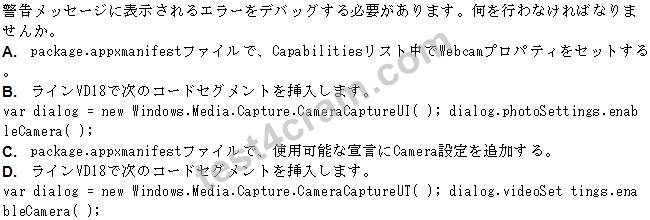




- A. var canPan = mediaCaptureSettings.pan.capabilities .supported;
- B. var canFocus = videoDev.getEeviceProperty("focus");
- C. var car.Zoom = videoDev.getEeviceProperty ("zoom");
- D. var canPan = videoDev.pan.capabilities.supported;
Correct Answer: D 🗳️


Viewing page 1 out of 14 pages.
Viewing questions 1-5 out of 70 questions.