

[Mar-2026] Fortinet FCSS_LED_AR-7.6 Exam Practice Test Questions - Test4Cram
Updated Certification Exam FCSS_LED_AR-7.6 Dumps - Practice Test Questions
NEW QUESTION # 59
How does FortiAnalyzer contribute to device quarantine actions in a Fortinet Security Fabric?
Response:
- A. Sends log-based event triggers to FortiGate
- B. Reboots affected FortiSwitch ports
- C. Provides automatic endpoint disconnection
- D. Triggers FortiAIOps remediation
Answer: A
NEW QUESTION # 60
You are configuring a new wireless network for your organization. The network requires users to authenticate through a RADIUS server for secure access. Which two security modes should you select when creating the SSID to ensure compatibility with the RADIUS server?
(Choose two.)
Response:
- A. WPA2-Enterprise
- B. WPA/WPA2 Mixed Mode
- C. WPA3-Enterprise
- D. WEP
- E. WPA-Personal
Answer: B,C
NEW QUESTION # 61
Refer to the exhibits.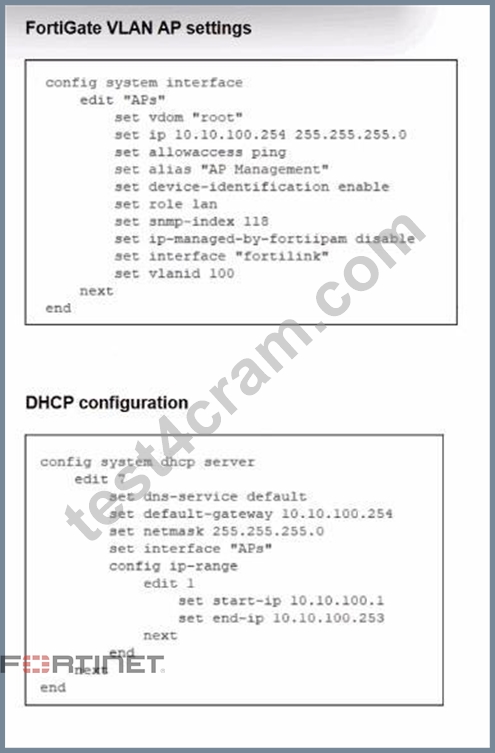
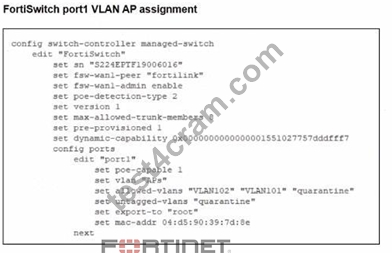
A FortiSwitch is successfully managed by a FortiGate. FortiAP is connected to port1 of the managed FortiSwitch. On FortiGate, the VLAN AP is configured to detect and manage FortiAP, along with a DHCP server for the VLAN AP. Additionally, the VLAN AP is assigned to port1 of FortiSwitch. However.
FortiGate is unable to detect or manage FortiAP.
Which FortiGate misconfiguration is preventing the detection of FortiAP?
- A. The FortiAP firmware is incompatible with the FortiGate firmware version.
- B. Security Fabric is disabled in the administrative access options of the VLAN.
- C. The VLAN is not tagged correctly on the FortiSwitch uplink port.
- D. The CAPWAP ports (UDP 5246 and 5247) are not open on FortiGate.
Answer: B
Explanation:
From the exhibits:
* Interface"APs"is a VLAN sub-interface onfortilinkwith IP10.10.100.254/24and a DHCP server scope
10.10.100.1-10.10.100.253.
* This VLAN is assigned toport1on the managed FortiSwitch for FortiAPs.
* The interface config showsonly allowaccess ping-Security Fabric Connection is not enabled.
In LAN Edge designs, FortiAPs connected through FortiSwitch are discovered and managed asLAN edge devices of the Security Fabric. FortiOS documentation states that FortiAPs and FortiSwitches appear in the Fabric topologyonly when connected on an interface with Security Fabric Connection enabled.
If the VLAN/AP management interface lacksSecurity Fabric Connection:
* FortiGate does not treat that network as aFabric connection segment.
* CAPWAP discovery from FortiAPs on that VLAN will not result in the AP being onboarded and shown for management.
Therefore the key misconfiguration is:
#A - Security Fabric is disabled on the VLAN interface used for AP management.
Why the others are not the root cause:
* B. Firmware incompatibility- would usually show as a "Managed (upgrade required)" or similar status after discovery, not complete non-detection. The scenario specifically points to a configuration issue, not firmware.
* C. VLAN not tagged correctly on uplink- The FortiSwitch uplink to FortiGate is the FortiLink trunk, and the VLAN sub-interface APs is already bound to fortilink, so tagging on the uplink is correct by definition.
* D. CAPWAP ports not open- CAPWAP (UDP 5246/5247) is terminated locally on FortiGate and does not depend on any firewall policy; these ports are open on the FortiGate itself by default.
NEW QUESTION # 62
What does it mean if a FortiSwitch status is "Managed (Disconnected)" in FortiGate?
Response:
- A. It has been removed from the managed switch group
- B. It has not been registered
- C. It is no longer receiving configuration updates or heartbeats
- D. It is in standalone mode
Answer: C
NEW QUESTION # 63
Refer to the exhibits.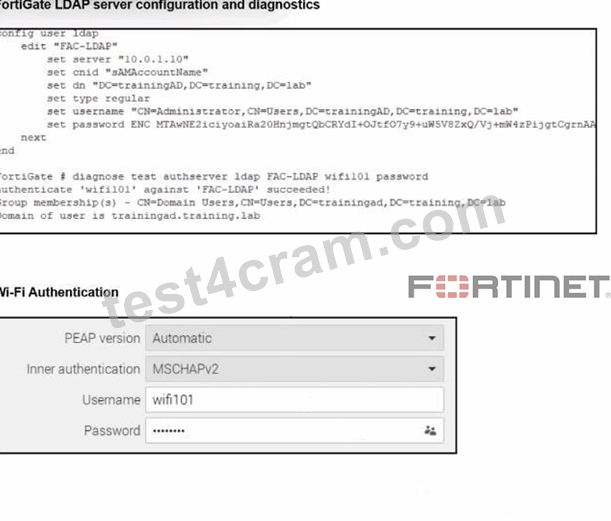
An LDAP server has been successfully configured on FortiGate. which forwards LDAP authentication requests to a Windows Active Directory (AD) server. Wireless users report that they are unable to authenticate. Upon troubleshooting, you find that authentication fails when using MSCHAPv2.
What is the most likely reason for this issue?
- A. FortiGate does not support MSCHAPv2 for LDAP authentication.
- B. A firewall policy is missing an LDAP authentication rule.
- C. The FortiGate LDAP configuration is missing the correct Bind DN.
- D. The Windows AD server requires LDAPS (LDAP over SSL) for authentication.
Answer: A
Explanation:
From the exhibit, LDAP on FortiGate is correctly configured and tested:
diagnose test authserver ldap FAC-LDAP wifi101 password
authenticate 'wifi101' against 'FAC-LDAP' succeeded!
Group membership(s) - CN=Domain Users,...
So:
* LDAP connectivity works
* Bind DN, DN, CNID, and credentials are correct(so optionCis eliminated).
* Firewall policies do not affect the802.1X / Wi-Fi authentication stepitself, soAis not the root cause.
* Nothing in the scenario indicates that AD is enforcing LDAPS-only; the LDAP test already succeeds using the configured parameters, soBis also excluded.
The Wi-Fi supplicant is configured forPEAP with inner authentication = MSCHAPv2.
MSCHAPv2 is achallenge-response mechanism designed for RADIUS, not for LDAP simple bind.
FortiGate's LDAP implementation uses asimple bind (username/password) over LDAP or LDAPS, and it doesnotimplement MSCHAPv2 against LDAP backends.
In Fortinet's design, if you needPEAP-MSCHAPv2 with Active Directory, you must use:
* ARADIUS server(such as Windows NPS or FortiAuthenticator), and
* Have FortiGate use RADIUS,notLDAP, as the authentication backend for 802.1X / Wi-Fi users.
Because FortiGate cannot process MSCHAPv2 exchanges directly against an LDAP server, authentication fails when the inner method is MSCHAPv2, even though LDAP works when tested with a simple bind from the CLI.
NEW QUESTION # 64
What is the primary outcome when a device is quarantined on a FortiGate-managed network?
Response:
- A. The device is redirected to a captive portal for login
- B. The device is denied access to the network through policy enforcement
- C. The device's MAC address is blocked by DNS filter
- D. The device is forced to reauthenticate using 802.1X
Answer: B
NEW QUESTION # 65 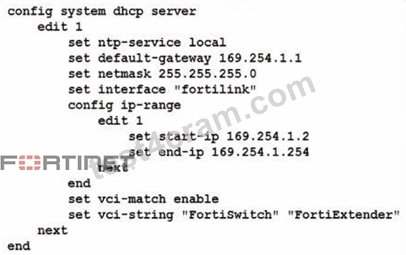
You've configured the FortiLink interface, and the DHCP server is enabled by default. The resulting DHCP server settings are shown in the exhibit. What is the role of the vci-string setting in this configuration?
- A. To connect, devices must match the VCI string; otherwise, they will not receive an IP address.
- B. To ignore DHCP requests coming from FortiSwitch and FortiExtender devices.
- C. To restrict the IP address assignment to devices that have FortiSwitch or FortiExtender as their hostname.
- D. To reserve IP addresses for FortiSwitch and FortiExtender devices.
Answer: A
Explanation:
The DHCP configuration shows:
set vci-match enable
set vci-string "FortiSwitch" "FortiExtender"
What this means
VCI = Vendor Class Identifier (DHCP option 60)
When vci-match is enabled, the DHCP server will only respond to DHCP requests from clients whose VCI string matches the configured vendor identifiers.
FortiSwitch and FortiExtender both send DHCP option 60 with:
"FortiSwitch"
"FortiExtender"
This is used in FortiLink deployments so only these devices receive IP addresses on the FortiLink network.
Therefore:
C). To connect, devices must match the VCI string; otherwise, they will not receive an IP address.
#Correct.
This perfectly matches FortiGate FortiLink DHCP behavior.
Summary of incorrect options
A - Ignore FortiSwitch/FortiExtender
#Opposite behavior.
B - Restrict based on hostname
#VCI does NOT check hostname.
D - Reserve IPs
#No reservation occurs; it's filtering, not reserving.
NEW QUESTION # 66
When troubleshooting a captive portal issue, which POST parameter in the redirected HTTPS request can be used to track the user's session and ensure that the request is valid?
- A. username
- B. email
- C. redir
- D. magic
Answer: D
Explanation:
In FortiGate captive portal workflows (local or external):
* Client connects to SSID / interface that has captive portal enabled.
* Client makes an HTTP/HTTPS request.
* FortiGate intercepts and redirects to alogin page(local or external URL).
* The portal form is submitted viaPOSTback to FortiGate.
To prevent tampering and to tie the POST back to thecorrect user session, FortiGate includes a special hidden parameter in the redirect and expects it in the POST:
* The parameter is namedmagic.
The magic value:
* Is aunique tokengenerated per captive-portal session.
* Encodes/session-links the user's IP, interface, and session info.
* Allows FortiGate to ensure that:
* The POST comes from the user who initiated the original request.
* The request is not a random or replayed submission.
When troubleshooting:
* If the external portal does notpreserve and resendthe magic parameter back to FortiGate exactly as received, authentication fails, and you'll see errors like "session not found" or "invalid magic".
Why the other fields are not used for this purpose
* A. username- Just the login ID; multiple users can use the same username from different locations, so it can't uniquely track the browser session.
* B. redir- Contains the URL the user originally requested, so they can be sent back there after login. It is not a session integrity token.
* D. email- Optional field used in some guest/registration flows; irrelevant to session validation.
NEW QUESTION # 67
A network administrator connects a new FortiGate to the network, allowing it to automatically discover andI register with FortiManager.
What occurs after FortiGate retrieves the FortiManager address?
- A. The device needs to be manually authorized on FortiManager.
- B. FortiGate sends a discovery request to all devices on the local network using UDP port 1068.
- C. FortiGate configures its interface settings based on a DHCP response from FortiManager.
- D. FortiGate establishes a secure tunnel to FortiManager over TCP port 541.
Answer: D
Explanation:
When a FortiGate is deployed usingZero Touch Provisioning (ZTP)or auto-discovery:
* FortiGate retrieves theFortiManager IP address(from DHCP Option 240, FortiCloud/ZTNA provisioning, or manual set).
* The next step isnot UI authorizationor DHCP changes-it immediately attempts to form aFGFM (FortiGate-FortiManager) tunnel.
* The FGFM protocol usesTCP port 541to establish a secure management channel.
FortiManager will still require manual authorization of the deviceinside FortiManager, but this occursafter the tunnel is established.
Therefore, the first automatic action after retrieving the FMG address iscreating the secure FGFM tunnel on TCP/541.
NEW QUESTION # 68 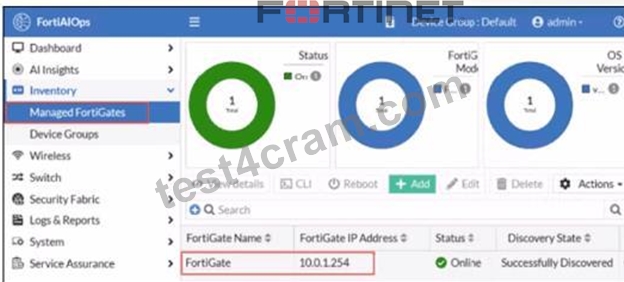
FortiGate has been added to FortiAIOps for management.
Which step must be performed on FortiAIOps to add a FortiSwitch device connected to the recently added FortiGate?
- A. FortiSwitch is added automatically.
- B. Add the FortiSwitch device by submitting its serial number.
- C. Configure the FortiSwitch IP address, user ID, and password
- D. FortiAIOps requires that the FortiSwitch IP address is submitted.
Answer: A
Explanation:
In a LAN Edge deployment:
* FortiSwitch is managedthrough FortiGate via FortiLink.
* FortiAIOps integrates withFortiGateas the single managed device; from there it gains visibility intoall Fabric and LAN-edge devices(FortiSwitch, FortiAP) that are registered to that FortiGate.
Once the FortiGate is successfully added to FortiAIOps (as shown in the exhibit, statusOnline / Successfully Discovered), all FortiSwitches managed by that FortiGate are:
* Discovered automatically through the FortiGate-FortiAIOps connection
* Shown under the appropriate inventory / switch views withno separate onboarding stepfor each switch.
This is why no extra IP, serial number, or credential entry is required for FortiSwitch.
So:
* AandBsuggest manual per-switch onboarding, which is not how FortiAIOps works with LAN Edge.
* Dsimilarly assumes direct FortiSwitch management, but FortiAIOps talks toFortiGate, not the switch.
Therefore the correct behavior is that theFortiSwitch is added automatically (C)once its managing FortiGate is connected to FortiAIOps.
NEW QUESTION # 69
Your team is planning to configure a FortiGate wireless network that automatically quarantines devices using automation stitches. Which two configurations must be in place for a wireless client to be successfully quarantined upon detecting IOC events?
(Choose two.)
Response:
- A. FortiAnalyzer must have a valid threat detection services license.
- B. SSIDs must be configured in Bridge mode.
- C. Configure FortiGate as a member of a Security Fabric group.
- D. Enable Device Detection at the interface level.
Answer: A,C
NEW QUESTION # 70
Which authentication method is triggered when a device does not support 802.1X but needs to access the network using its MAC address?
Response:
- A. LDAP-based login
- B. EAP-TLS
- C. MAC Authentication Bypass (MAB)
- D. RADIUS EAP chaining
Answer: C
NEW QUESTION # 71
Refer to the exhibit.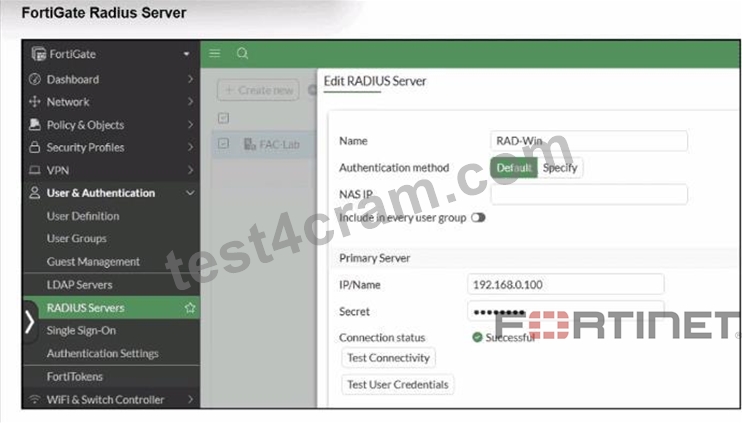

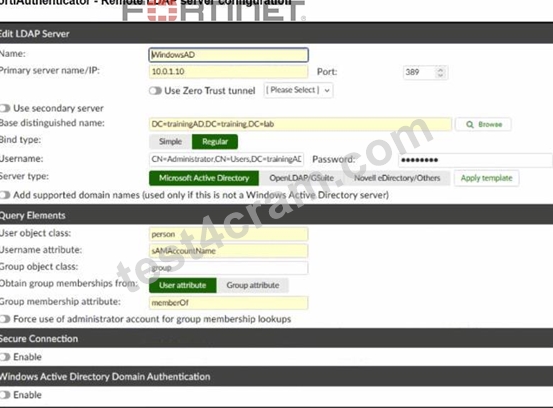
A RADIUS server has been successfully configured on FortiGate, which sends RADIUS authentication requests to FortiAuthenticator. FortiAuthenticator, in turn, relays the authentication using LDAP to a Windows Active Directory server.
It was reported that wireless users are unable to authenticate successfully.
The FortiGate configuration confirms that it can connect to the RADIUS server without issues.
While testing authentication on FortiGate using the command diagnose test authserver radius, it was observed that authentication succeeds with PAP but fails with MSCHAPv2.
Additionally, the Remote LDAP Server configuration on FortiAuthenticator was reviewed.
Which configuration change might resolve this issue?
- A. Manually add user credentials to the FortiAuthenticator local database
- B. Change the RADIUS authentication protocol to CHAP
- C. Enable Windows Active Directory Domain Authentication.
- D. Use RADIUS attributes under the FortiGate configuration.
Answer: C
Explanation:
From the exhibits and text:
* FortiGate #RADIUS# FortiAuthenticator
* FortiAuthenticator #LDAP# Windows AD
* diagnose test authserver radius ... papsucceeds
* diagnose test authserver radius ... mschap2fails
This behavior matches a classic limitation documented in FortiOS:
When usingLDAPas the back-end, the RADIUS server must usePAP. CHAP/MS-CHAPv2 arenot supported with plain LDAP because the server cannot validate the challenge-response without access to password hashes.
In the Remote LDAP server config on FortiAuthenticator, the option"Windows Active Directory Domain Authentication" is disabled.When this feature isenabled, FortiAuthenticator can talk to AD usingKerberos
/NTLMinstead of a simple LDAP bind, whichdoes support MS-CHAPv2for incoming RADIUS authentications.
So to allow MS-CHAPv2 all the way from FortiGate to AD, you must:
* Keep FortiGate using RADIUS with MS-CHAPv2 # FortiAuthenticator
* EnableWindows Active Directory Domain Authenticationso FortiAuthenticator can properly validate MS-CHAPv2 against AD.
Why the other options are wrong:
* A. Change to CHAP- CHAP still cannot be validated over LDAP; docs say LDAP back-ends must use PAP.
* C. Manually add users to local DB- That would allow local-DB auth but does not fix MS-CHAPv2 against AD.
* D. Use RADIUS attributes on FortiGate- Attributes do not influence the EAP inner method; they don't fix MS-CHAPv2 failures.
Therefore the configuration change that can realistically fix the MS-CHAPv2 problem isenabling Windows Active Directory Domain Authentication on FortiAuthenticator (B).
NEW QUESTION # 72
You are configuring 2FA using EAP-TLS. Which field must the certificate include to match the username?
Response:
- A. Subject Alternative Name
- B. Serial Number
- C. Issuer DN
- D. Expiration Date
Answer: A
NEW QUESTION # 73
What insight can FortiAIOps provide that traditional monitoring systems cannot?
Response:
- A. Historical Syslog reports
- B. VLAN configuration recommendations
- C. AI-driven anomaly detection and root cause suggestions
- D. CPU and memory usage
Answer: C
NEW QUESTION # 74
Which steps are required to configure RADIUS SSO (RSSO) on FortiAuthenticator?
(Choose three)
Response:
- A. Enable RSSO in FortiGate security policy
- B. Define RSSO attribute in FortiAuthenticator
- C. Enable RSSO group mapping
- D. Configure FortiGate to use FortiAuthenticator as RADIUS server
- E. Set FortiAuthenticator as LDAP proxy
Answer: B,C,D
NEW QUESTION # 75
What is the default behavior of a factory-reset FortiGate with internet access and no configuration?
Response:
- A. It self-registers to FortiManager via FortiDeploy
- B. It requests a dynamic IP from DHCP
- C. It starts in transparent mode
- D. It waits for manual config via console
Answer: A
NEW QUESTION # 76
How can FortiAIOps help optimize network performance in an SD-Branch deployment with FortiGate, FortiSwitch, and FortiAP?
- A. It removes the need for SD-WAN configuration by automating all routing decisions.
- B. It predicts and resolves all network issues without any human intervention.
- C. It uses Al-driven analytics to identify network issues and provide optimization recommendations.
- D. It disables low-performing APs and switches automatically.
Answer: C
Explanation:
In an SD-Branch deployment (FortiGate + FortiSwitch + FortiAP),FortiAIOps:
* Collects telemetry and logs from Fabric devices
* Usesmachine-learning / AI analyticsto:
* Spot anomalies (latency, packet loss, RF issues, misconfigurations)
* Highlight root causes
* Proposeoptimization recommendations(e.g., channel changes, power tuning, config fixes) It doesnot:
* Automatically disable devices (Afalse)
* Replace SD-WAN config or all routing (Cfalse)
* Fixallissues with zero human input (Dis marketing fantasy, not reality)
NEW QUESTION # 77
Refer to the exhibits.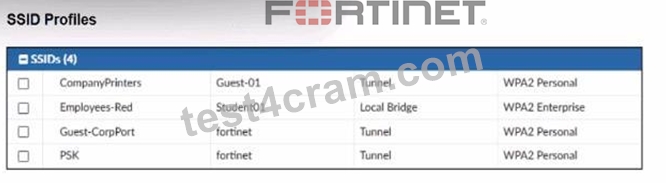
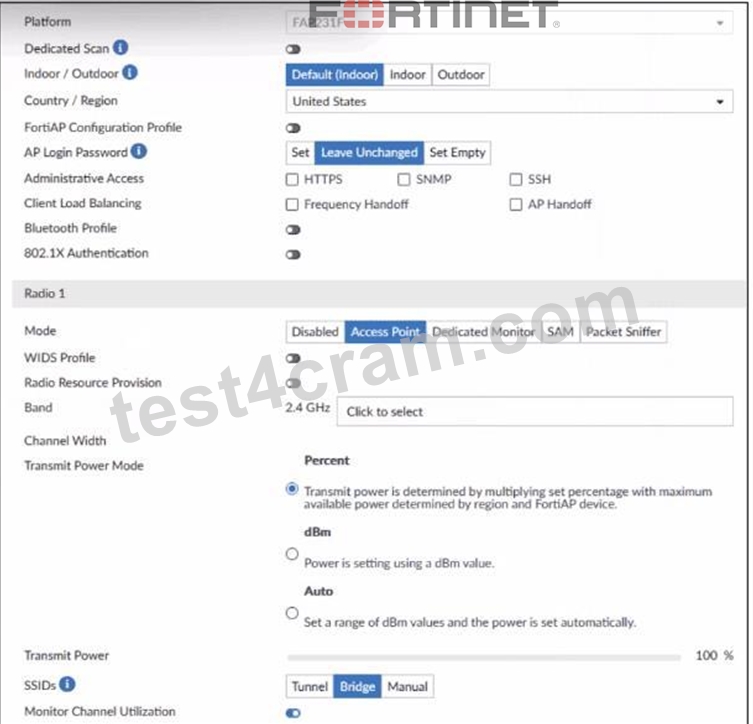
A set of SSID profiles has been configured on FortiManager, and an AP profile has been assigned to a group of AP managed by FortiGate. However, none of the designated SSIDs are being broadcast by these APs.
Which configuration change is required to make the APs broadcast these SSIDs as intended?
- A. Set the Transmit Power Mode to Auto.
- B. Choose Manual in the SSIDs setting and select the SSIDs to broadcast.
- C. Change the AP profile to use a platform that supports the configured mix of SSIDs.
- D. Adjust the AP profile to ensure all SSIDs are configured in a supported mode, either bridge or tunnel, but not a mix of both.
Answer: B
Explanation:
From the exhibits:
* The AP profile shows:
* SSIDs: Tunnel | Bridge | Manual
* The current setting isBridge, not Manual.
* WhenBridgeorTunnelis selected, the AP profiledoes NOT automatically broadcast SSIDsunless the corresponding VAPs were explicitly mapped in the AP profile.
* FortiManager SSID profiles are created, but unless these are explicitly applied underManual SSIDs selection, the AP will not broadcast any SSID.
Fortinet documentation states:
"To control which SSIDs an AP broadcasts, the AP Profile must have SSIDs set toManual, and the desired SSIDs must be selected." Therefore, to make the AP broadcast the intended SSIDs:
#You must switch the SSIDs setting to Manual, and manually select the SSIDs (CompanyPrinters, Student01, Guest-CorpPort, PSK).
Why the other options are incorrect:
* A. Adjust AP profile to avoid mixing bridge/tunnelMixed modes ARE supported. Not the issue.
* B. Change platformThe platform (FAP231F) already supports all listed SSIDs.
* D. Set transmit power mode to autoPower settings have nothing to do with SSID broadcasting.
NEW QUESTION # 78
Which two actions must be completed before a FortiGate can be provisioned using ZTP?
(Choose two)
Response:
- A. Assign a policy package to the device
- B. Set up DNS server for resolving FortiManager
- C. Manually configure VLANs
- D. Configure local admin password
Answer: A,B
NEW QUESTION # 79
In FortiManager CLI, how do you enable FortiAIOps monitoring?
Response:
- A. config system global → set ai-monitor enable
- B. config system aiops → set enable
- C. FortiAIOps is enabled by default in managed mode
- D. config aiops settings → set collection-mode full
Answer: C
NEW QUESTION # 80
......
Updated Verified FCSS_LED_AR-7.6 dumps Q&As - Pass Guarantee or Full Refund: https://www.test4cram.com/FCSS_LED_AR-7.6_real-exam-dumps.html
FCSS_LED_AR-7.6 PDF Questions and Testing Engine With 127 Questions: https://drive.google.com/open?id=1Tq83qNlVSMwMWFeO9UU2IvK1_CPmbPX7