

The gap between deciding to certify and starting to study should be measured in minutes. Test4Cram emails your 3V0-643 package within one minute of payment — 23 practice questions for the VMware Certified Advanced Professional 6 - Network Virtualization Deployment, ready before your motivation cools.
VMware 3V0-643 Exam Overview:
| Certification Vendor: | VMware |
|---|---|
| Exam Name: | VMware Certified Advanced Professional 6 - Network Virtualization Deployment Exam |
| Exam Number: | 3V0-643 |
| Exam Format: | Lab-based practical tasks |
| Exam Price: | $450 USD |
| Related Certifications: | VCAP6-NV Design VMware Certified Professional – Network Virtualization (VCP-NV) |
| Passing Score: | 300 |
| Exam Duration: | 205 minutes |
| Real Exam Qty: | 23 |
| Available Languages: | English |
| Sample Questions: |  |
| Exam Way: | Lab-based proctored exam delivered through testing centers (Pearson VUE or similar). |
| Pre Condition: | Recommended: Valid VCP-NV certification and hands-on experience deploying and managing VMware NSX environments with vSphere; typically 2+ years of relevant experience. :contentReference[oaicite:0]{index=0} |
| Official Syllabus URL: | https://www.vmware.com/education-services/certification/vcap6-nv-deploy-exam.html |
VMware 3V0-643 Exam Syllabus Topics:
| Section | Objectives |
|---|---|
| NSX Logical Networking and Routing | - Logical routing architecture - Logical switching and transport zones |
| Prepare and Configure Host Clusters for NSX | - Add and remove hosts from NSX deployment - Configure VXLAN transport parameters - Prepare vSphere Distributed Switch for NSX |
| Security and Troubleshooting | - Troubleshoot NSX connectivity issues - Configure firewall and security policies |
| Deploy VMware NSX Infrastructure Components | - Specify Syslog and logging configuration - Integrate NSX Manager with vCenter Server - Deploy NSX Manager appliance - Configure Single Sign-On and NSX Controllers |
| Configure NSX Edge Services | - Create and manage DHCP static bindings and IP pools - Configure DHCP services and relay |
Everything Candidates Ask About the VMware 3V0-643 Exam
On delivery: the download is available the moment your payment clears, and a copy reaches your email within one minute. If 2 hours pass and nothing arrives, check spam and contact our support team. Install the software on as many computers as you need — there is no device limit.
On outcomes: if you take the 3V0-643 exam within 60 days of purchase and do not pass, the Test4Cram money back guarantee applies. File your claim within 2 days of the exam with a scanned enrollment slip and the official score report (PDF); claims are processed within 7 days. The candidate name must match the payer name, and the policy excludes exams taken within 3 days of purchase, purchases never used in an actual exam attempt, free materials, and expired orders. Alternatively, you can exchange the product for two free exam packages of equal value and keep the update service on your original purchase.
The 3V0-643 exam gives you 205 minutes to work through 23 questions. That pace punishes perfectionism — the candidates who struggle are usually the ones who burned ten minutes on one stubborn item. Train the skill directly: take timed, full-length mocks in the Test4Cram desktop or online test engine, practice skipping and returning, and walk in with a pacing strategy you have already tested.
Recommended: Valid VCP-NV certification and hands-on experience deploying and managing VMware NSX environments with vSphere; typically 2+ years of relevant experience. :contentReference[oaicite:0]{index=0}
Vendor requirements do change, so before you commit to an exam date, confirm the latest eligibility rules on the official VMware exam page.
The VMware Certified Advanced Professional 6 - Network Virtualization Deployment syllabus is split into 5 domains, anchored by Configure NSX Edge Services, Deploy VMware NSX Infrastructure Components, and Security and Troubleshooting. The full breakdown sits in the syllabus section above — treat it as the checklist that decides where your study hours go.
The passing mark for the 3V0-643 exam is 300, and the official registration fee is $450 USD. Remember that the fee covers a single attempt — fail, and the retake costs the same again with no loyalty discount. Protect the budget by self-testing first: drill 23 practice questions at Test4Cram under timed conditions until your scores clear the bar with margin, then register.
The 3V0-643 exam, officially the VMware Certified Advanced Professional 6 - Network Virtualization Deployment Exam, is VMware's benchmark for proving you can work with its technologies in professional settings; passing it awards the VCAP-NV Deploy 2020 certification, which sits at the Advanced Professional level. Because the credential is issued by the vendor itself, it carries weight with employers that self-assessed skills simply cannot match. It also opens the road toward VMware Certified Professional – Network Virtualization (VCP-NV), VCAP6-NV Design.
Yes — Test4Cram publishes a free PDF demo of the 3V0-643 materials so you can check the question quality and verified answers before paying anything. Once you purchase, 365 days of free updates come standard, and if your product expires you can renew the update service at a 50% discount from your member zone.
VMware Certified Advanced Professional 6 - Network Virtualization Deployment Sample Questions:
Configure the Layer 3 connectivity between the newly created Dev-segments by assigning them to a new DLR named Dev-DLR-NEW.
Requirements:
vCenter: vcsa-01a.corp.local
Ccredentials: [email protected] . VMware1!
Default GW for Dev-subnets:
Dev-Web-Tier-01-NEW172.16.10.1/24
Dev-App-Tier-01-NEW172.16.20.1/24
Dev-DB-Tier-01-NEW172.16.30.1/24
DLR Settings:
DLR Name: Dev-DLR-NEW
Uplink IP Address: 192.168.6.5/30
Interface: Dev-Transit
Password: VMware1!WMware1!
Cluster: Management & Edge Cluster
Ensure east-west routing has been optimized.
The control plane failover should begin 15 seconds on logical switch HA-VXLAN.
Ensure secure shell is available.
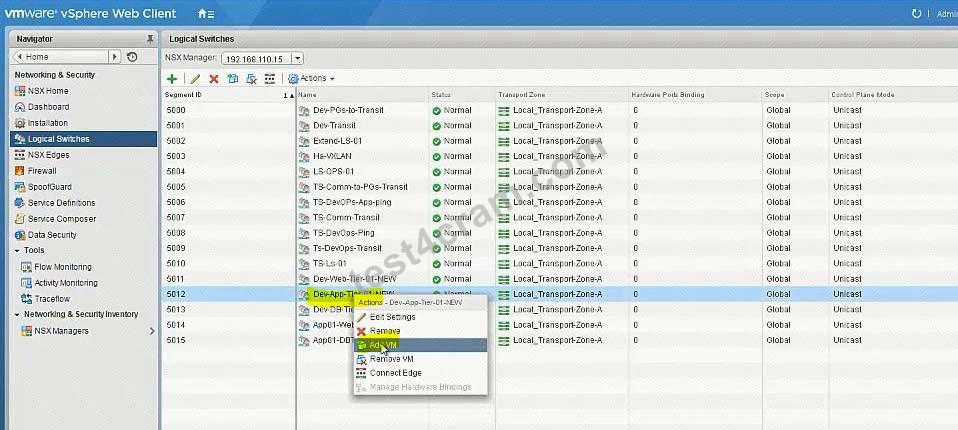
Connect the Web, App and DB virtual machines to their respective dev tiers.
Dev-web-01, Dev-web-02a, Dev-web-04a
Dev-app-01a
Dev-db-01a
HOL LAB for Practice:
also deploy Distributed logical router DLR in the same way the lab.
See the explanation part for complete solution.
Correct Answer:
SOLUTION:
Add VMs to respective Logical Switches: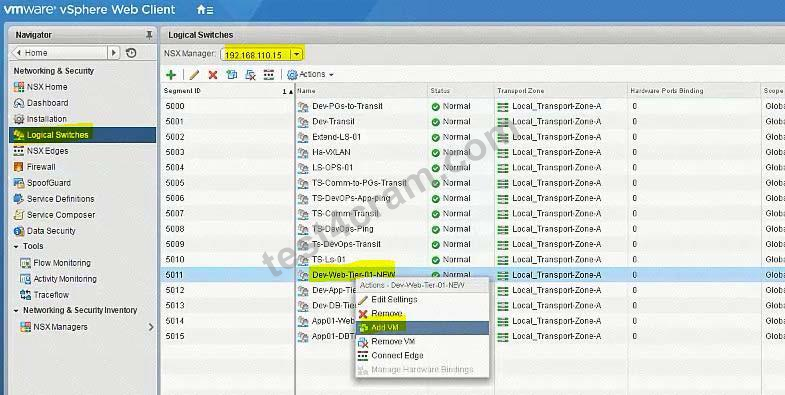




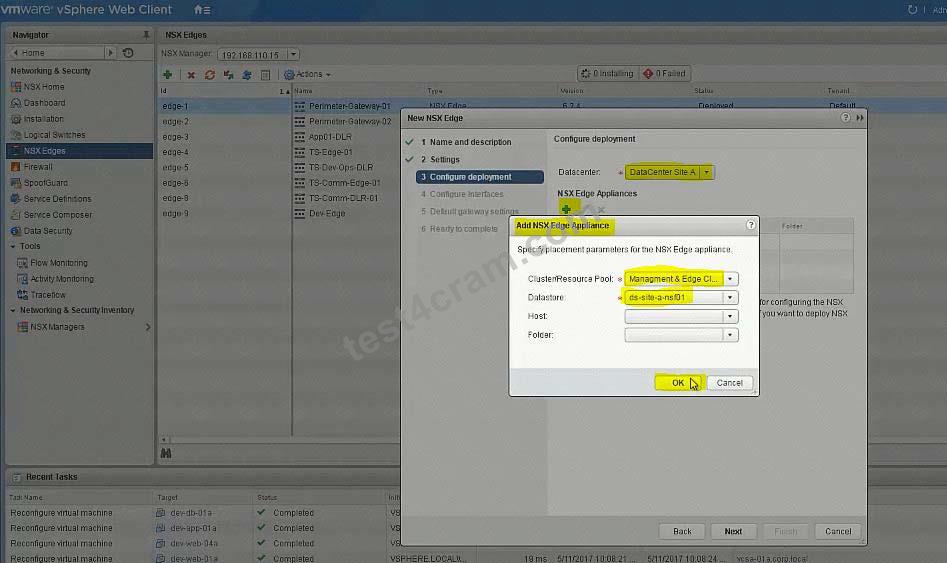


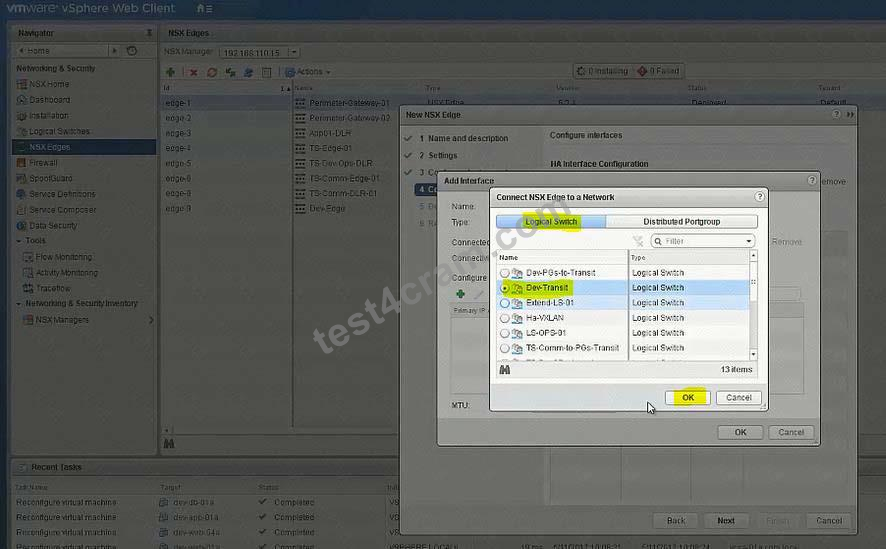


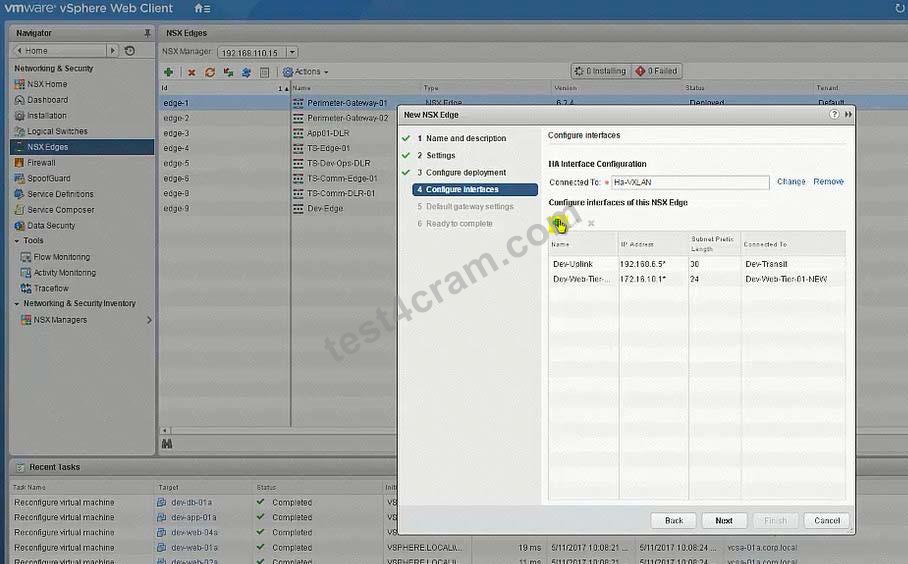


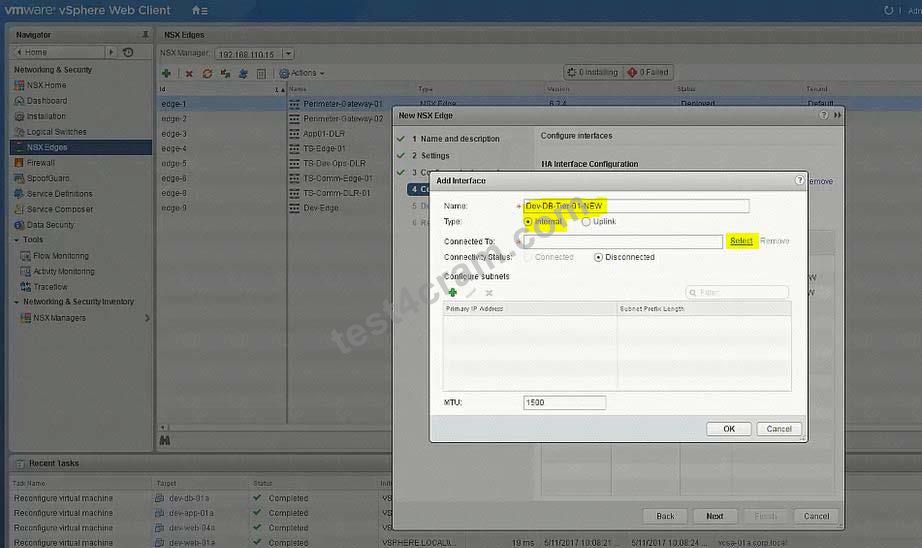
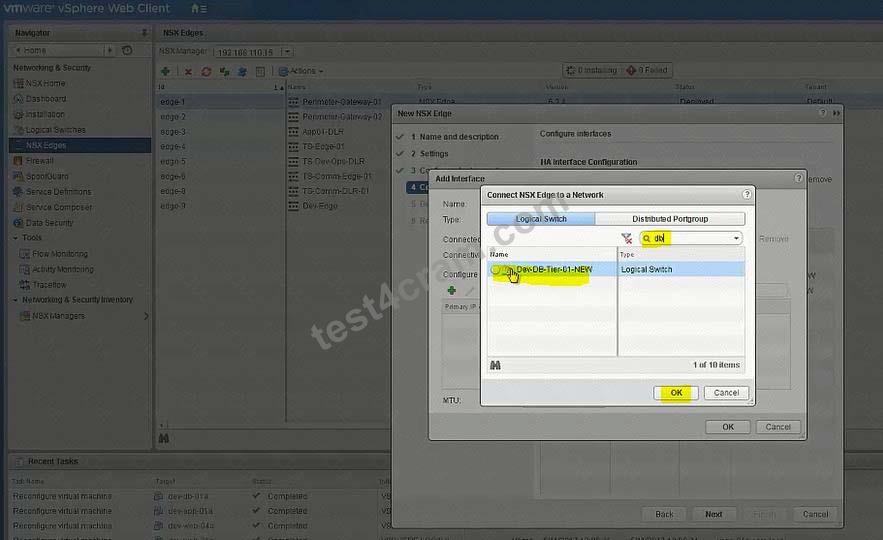


No need for below
To change the control plane failover within 15 seconds use the RESTClient as shown below or the Postman application in Chrome.
Open Firefox
Open RESTClient from Firefox
Authentication
Basic Authenticaion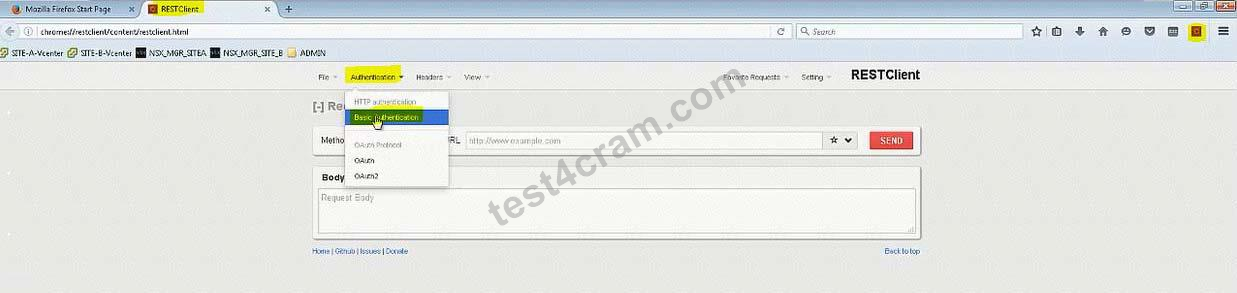
Admin
VMware1!
Headers
Custom Headers
Content-Type
Application/xml

Note down the edge id of newly created DLR (in exam its edge-12)
There will be a NSX API guide on desktop and look for "declaredeadtime".
Or memorize below string:
URL: https://192.168.110.15/api/4.0/edges/edge-10/highavailability/config Note: in exam its edge-12 but make sure!

Change the value to 15
Body:
<highAvailability>
<declareDeadTime>15</declareDeadTime>
</highAvailability>

You have been tasked with enabling syslog on the NSX Manager (nsmgr-01a.corp.local) and all NSX Controllers.
Requirements:
vCenter: vcsa-01a.crop.local
NSX Manager A: nsxmgr-01a.corp.local
Password: VMware1!
Syslog Information:
Server: 192.168.110.24
Port: 514
Protocol: UDP
Header Information:
Authentication: Basic
Content-Type: application/xml
Enable syslog for NSX Manager.
Enable syslog for NSX controllers.
HOL LAB for Practice:
See the explanation part for complete solution.
Correct Answer:
SOLUTION:


Open API guide from desktop, scroll down for Controller Syslog URI.
In exam search function doesn't work so you should be familiar with the document.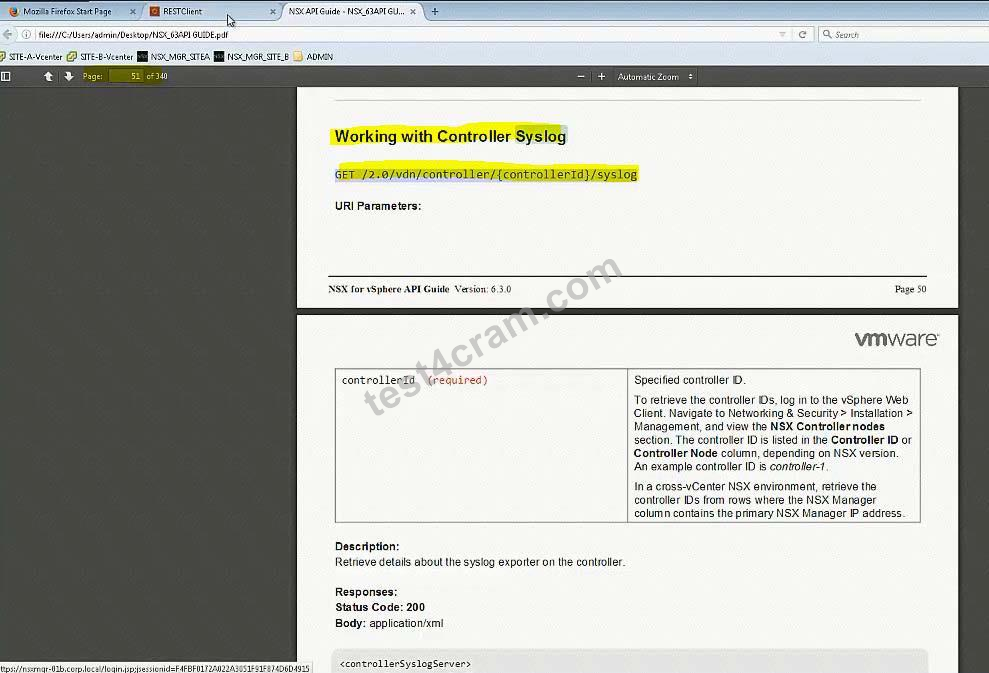
In exam, user hostname instead of IP address (IP address wont work).
For version (2.0), also check API guide version, it could be 2.1 or 2.0 GET
https:// nsxmgr-01a.corp.local/api/2.0/vdn/controller/controller-1/syslog

Copy the required parameters from API guide or memorize.
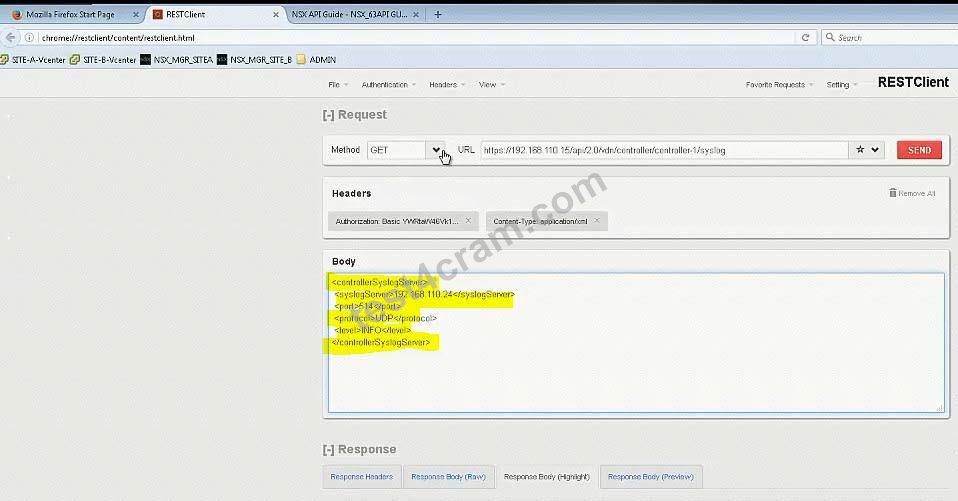

Verify
Do the same for controller-2
Do the same for controller-3
In the Dev environment, you have the application and database servers on separate networks created previously. Configure inbound only network security to allow only Dev application servers access to Dev database servers using MYSQL service port.
Requirements:
vCenter: vcsa-01a.corp.local
Credentials: [email protected] / VMware1!
Service Port: MYSQL
Networks: Dev-App-Tier-01-NEW and Dev-DB-Tier-01-NEW
Credentials for Dev VMs: root / VMware1!
This rule should be in its own "DB security-NEW" section.
Ensure inbound only network security allows Dev application servers access to Dev database servers.
This rule should not be prpogated to all NSX prepared clusters.
This rule should be created in a way that any new virtual machines on App and DB segments will be secured.
This rule should be created with the fewest rule(s) possible.
All other servers should be denied.
Ensure inbound security requirements are met.
HOL LAB for Practice:
See the explanation part for complete solution.
Correct Answer:
SOLUTION:
Firewall -> add new Section:

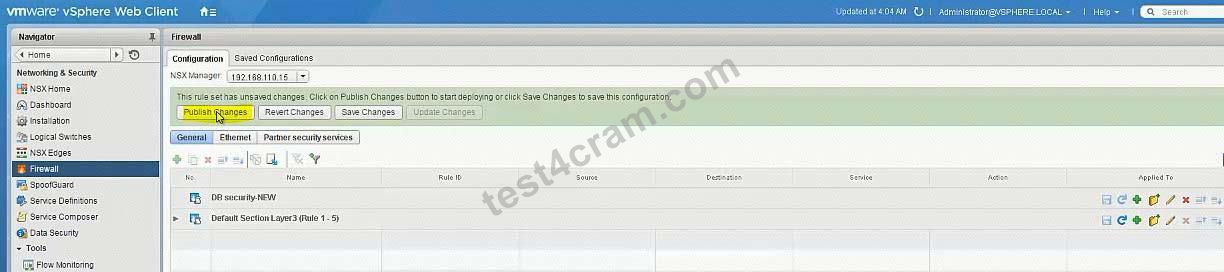
Add new Rule under newly created Section:
Edit Rule Name: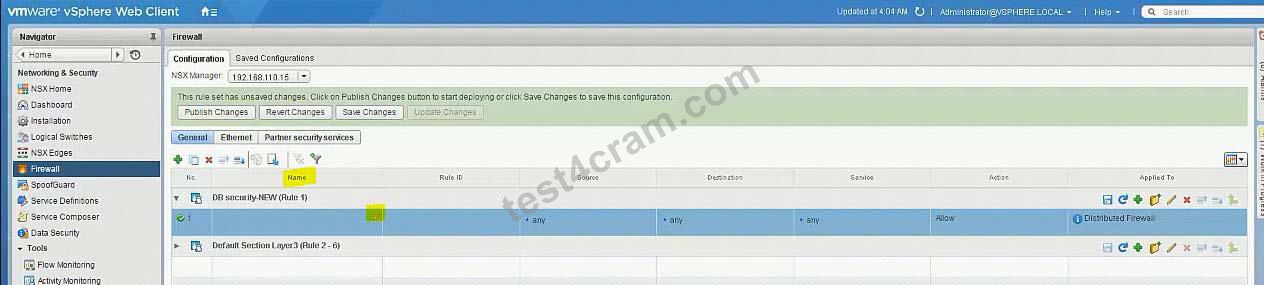

Source = Dev-App-Tier-01-NEW (LS)
Destination = Dev-DB-Tier-01-NEW (LS)
Service = MySQL
Allow - In
Applied To: Logical Switch = Dev-DB-Tier-01-NEW
Add another rule = To Deny

Set destination: Logical Switch = Dev-DB-Tier-01-NEW

Bring to last the Deny rule:

Viewing page 1 out of 8 pages.
Viewing questions 1-3 out of 23 questions.














