

Released Microsoft MS-203 Updated Questions PDF
MS-203 Dumps and Practice Test (222 Exam Questions)
Once you’ve dealt with all those courses, you may wish to check the study guides available on Amazon for tests MS-203. One such example is:
- How I Passed MS-203: Microsoft 365 Messaging Exam: Sure Shot Certification Tips by Empirical Matt Publications
‘How I Passed MS-203’ book takes a unique approach to help you prepare for your certification exam. The publisher surveys a couple of successful certified Messaging Administrators and distills their experiences into this 53-page book. Amongst other things, the respondents shared information about their preparation methods. The aim is that you glean wisdom from these individuals’ journey towards acing MS-203 and earning the associated certificate and use these lessons to guide your preparation. This resource makes your journey towards certification less lonely and enormously improves the odds of success in the real exam.
Securing the Messaging Environment
This domain is focused on the management of role-based permissions, ensuring message hygiene using office 365 advanced threat and exchange online, and compliance. To get ready for the questions under this section, one should gain enough knowledge about the following: the administration of role groups and user roles, planning of RBAC roles, connection filters, performing monitoring of the quarantined items, and ensuring protection for phishing. Along with this, candidates should be skilled in configuring ATP safe links, safe attachments, audit logs, etc.
NEW QUESTION 83
You have a Microsoft Exchange Online tenant.
All users are assigned only an Office 365 Enterprise E3 license.
You need to ensure that the users can use only Microsoft Outlook to connect to their Microsoft 365 mailbox when they connect from an Android device.
What should you create?
- A. a connection filter policy in Exchange Online Protection (EOP)
- B. a conditional access policy in Azure Active Directory (Azure AD)
- C. an app protection policy in Microsoft Endpoint Manager
- D. an Outlook Web App policy in Exchange Online
Answer: B
Explanation:
Explanation
Office 365 Enterprise E3 includes Azure Active Directory Premium P1 which is required for Azure conditional access policies.
NEW QUESTION 84
You have a Microsoft Exchange Online tenant that contains 1,000 users.
You need to prevent 100 users in the finance department at your company from using Direct file access when using Outlook on the web. The solution must ensure that all the other users in the company can continue to use Direct file access when using Outlook on the web.
What should you do?
- A. Create and assign an Outlook Web App policy.
- B. Modify the default sharing policy.
- C. Modify the default Outlook Web App policy.
- D. Create and assign a sharing policy.
Answer: A
Explanation:
Explanation/Reference:
https://docs.microsoft.com/en-us/exchange/clients/outlook-on-the-web/mailbox-policies?view=exchserver-2019
NEW QUESTION 85
Your company has a Microsoft Exchange Online subscription for an email domain named contoso.com.
The company works with a partner company that uses an email domain named tailspintoys.com.
You need to configure the environment only to accept email from tailspintoys.com if the email is sent from an IP address of 131.107.12.85.
How should you configure the connector from the Exchange admin center? To answer, drag the appropriate options to the correct message settings. Each option may be used once, more than once, or not at all. You may need to drag the split bar between panes or scroll to view content.
NOTE: Each correct selection is worth one point.
Answer:
Explanation:
Explanation
https://docs.microsoft.com/en-us/exchange/mail-flow-best-practices/use-connectors-to-configure-mail-flow/set-u
NEW QUESTION 86
You have a Microsoft Exchange Server 2019 hybrid deployment.
You are migrating mailboxes from the on-premises organization to Exchange Online.
From the Exchange admin center, you create a new migration batch that includes 25 mailboxes, and then you select Manual Complete the batch.
Later, you must complete the migration of a mailbox named [email protected] in the batch as soon as possible. You discover that the status of the migration batch is Syncing, but the status of the move request for [email protected] is Synced.
You need to complete the migration of the [email protected] mailbox to Exchange Online as soon as possible.
How should you complete the command? To answer, select the appropriate options in the answer area.
NOTE: Each correct selection is worth one point.
Answer:
Explanation:
Explanation
Reference:
https://docs.microsoft.com/en-us/powershell/module/exchange/move-and-migration/set-moverequest?view=exch
NEW QUESTION 87
Note: This question is part of a series of questions that present the same scenario. Each question in the series contains a unique solution that might meet the stated goals. Some question sets might have more than one correct solution, while others might not have a correct solution.
After you answer a question in this section, you will NOT be able to return to it. As a result, these questions will not appear in the review screen.
You have a Microsoft Exchange Server 2019 organization that contains 200 mailboxes.
You need to add a second email address to each mailbox. The address must have a syntax that uses the first letter of each user's last name, followed by the user's first name, and then @fabrikam.com.
Solution: You convert all the mailboxes to shared mailboxes, and then you run the Set-Mailbox cmdlet and specify the -EmailAddressPolicyEnabled $false parameter.
Does this meet the goal?
- A. No
- B. Yes
Answer: A
Explanation:
Reference:
https://docs.microsoft.com/en-us/exchange/email-addresses-and-address-books/email-address-policies/email-add Email address policies define the rules that create email addresses for recipients in your Exchange organization.
The basic components of an email address policy are:
Email address templates: Define the email address format for the recipients (for example
<firstname>@contoso.com or <lastname>.<firstname>@contoso.com).
Recipient filter: Specifies the recipients whose email addresses are configured by the policy.
Priority: Specifies the order to apply the email address policies (important if a recipient is identified by more than one policy).
The EmailAddressPolicyEnabled parameter specifies whether to apply email address policies to this recipient.
Valid values are:
$true: Email address policies are applied to this recipient. This is the default value.
$false: Email address policies aren't applied to this recipient.
NEW QUESTION 88
You have a Microsoft Exchange Online tenant that contains the users shown in the following table.
From the Exchange admin center, you issue a Wipe Data command for User1 and User2.
What occurs on the device of each user? To answer, select the appropriate options in the answer area.
NOTE: Each correct selection is worth one point.
Answer:
Explanation:
Reference:
https://docs.microsoft.com/en-us/exchange/clients/exchange-activesync/remote-wipe?view=exchserver-2019
NEW QUESTION 89
You have a Microsoft Exchange Online tenant that contains the users shown in the following table.
From the Exchange admin center, you issue a Wipe Data command for User1 and User2.
What occurs on the device of each user? To answer, select the appropriate options in the answer area.
NOTE: Each correct selection is worth one point.
Answer:
Explanation:
Reference:
https://docs.microsoft.com/en-us/exchange/clients/exchange-activesync/remote-wipe?view=exchserver-2019
NEW QUESTION 90
You have a Microsoft Exchange Server 2019 organization.
You need to identify which accounts in Active Directory are assigned permissions to dismount mailbox databases.
How should you complete the command? To answer, drag the appropriate values to the correct targets. Each value may he used once, more than once, or not at all. You may need to drag the split bar between panes or scroll to view content.
NOTE: Each correct selection is worth one point.
Answer:
Explanation:
Reference:
https://docs.microsoft.com/en-us/powershell/exchange/find-exchange-cmdlet-permissions?view=exchange-ps
NEW QUESTION 91
You have a Microsoft Exchange Server 2019 organization named contoso.com and an Exchange Online tenant.
You plan to implement a hybrid deployment.
You have the certificates shown in the following table.
You need to identify which certificates can be assigned in the Microsoft Office 365 Exchange Hybrid Configuration wizard.
Which certificates should you identify?
- A. Cert1 only
- B. Cert2 and Cert3 only
- C. Cert2, Cert3, Cert4, and Cert5 only
- D. Cert3 and Cert5 only
- E. Cert2 and Cert4 only
- F. Cert4 and Cert5 only
Answer: F
Explanation:
Explanation/Reference:
https://docs.microsoft.com/en-us/exchange/certificate-requirements
NEW QUESTION 92
You have two mailboxes named Mailbox1 and Mailbox2 that have the ProhibitSendReceiveQuota parameter set to 50 GB.
From a Microsoft Exchange Online tenant, you run the following PowerShell command.
You receive the license status of each mailbox and discover the configurations shown in the following table.
You need to increase the quota for Mailbox1 and Mailbox2.
What should you do first?
- A. Assign a license to each mailbox.
- B. Place both mailboxes on retention hold.
- C. Enable an archive for each mailbox.
- D. Convert each mailbox into an equipment mailbox.
Answer: A
Explanation:
Explanation
Shared and resource mailboxes don't require a license. However, without a license, these mailboxes are limited to 50 GB. To increase the mailbox size, an E3 or E5 license must be assigned. This will increase the mailbox to 100 GB.
Reference:
https://docs.microsoft.com/en-us/office365/servicedescriptions/exchange-online-service-description/exchange-on
NEW QUESTION 93
Your company has a Microsoft Exchange Server 2019 hybrid deployment.
You are migrating mailboxes to Exchange Online by using remote mailbox move requests.
A recent security breach at the company required that the passwords of all privileged accounts be changed.
Since the password change, mailbox move requests are failing.
You need to ensure that the mailbox migration can resume.
What should you do first?
- A. From Exchange Online, run Set-MigrationConfig.
- B. From Exchange on-premises, run Set-MigrationConfig.
- C. From Exchange Online, run Set-MigrationEndpoint.
- D. From Exchange on-premises, run Set-MigrationEndpoint.
- E. Run iisreset /noforce on all the Exchange servers that have MRSProxy enabled.
Answer: D
Explanation:
Reference:
https://docs.microsoft.com/en-us/powershell/module/exchange/move-and-migration/set-migrationendpoint?view=exchange-ps
NEW QUESTION 94
You have a Microsoft Exchange Online tenant named contoso.com.
You create a partnership with two other companies named fabrikam.com and wingtiptoys.com. All the mailboxes of fabrikam.com are hosted in Microsoft 365. All the mailboxes of wingtiptoys.com are hosted in an on-premises Exchange Server 2019 organization.
You need to ensure that all the email messages sent from contoso.com to fabrikam.com and wingtiptoys.com is encrypted by using TLS.
What should you do?
- A. Create two remote domains.
- B. Configure one connector.
- C. Configure two mail flow rules.
- D. Create an organizational relationship.
- E. Run the Office 365 Exchange Hybrid Configuration wizard.
Answer: B
Explanation:
Explanation/Reference:
https://docs.microsoft.com/en-us/exchange/mail-flow-best-practices/use-connectors-to-configure-mail-flow/ set-up-connectors-for-secure-mail-flow-with-a-partner Plan and implement a hybrid configuration and migration Question Set 1
NEW QUESTION 95
You have a Microsoft Exchange Server 2019 hybrid deployment.
All Mailbox servers and domain controllers are in the same site.
You deploy an Edge Transport server.
You need to ensure that all SMTP traffic between the on-premises organization and Exchange Online is routed through the Edge Transport server.
Which four actions should you perform in sequence? To answer, move the appropriate actions from the list of actions to the answer area and arrange them in the correct order.
Answer:
Explanation:
New-EdgeSubscription -FileName "c:\EdgeServerSubscription.xml" This example creates the Edge Subscription file. It should be run on your Edge Transport server. New-EdgeSubscription -FileData ([byte[]]$(Get-Content -Path "C:\EdgeServerSubscription.xml" -Encoding Byte -ReadCount 0)) -Site "Default-First-Site-Name" This example also imports the Edge Subscription file generated in Example 1 to the Active Directory site Default-First-Site-Name; however, the end result is accomplished using one command. You must run this command on the Mailbox server. ref. https://docs.microsoft.com/en-us/powershell/module/exchange/mail-flow/new-edgesubscription?view=exchange-ps
NEW QUESTION 96
You need to implement a solution that meets the technical requirements for the retention of junk email, sent items, and deleted items.
What is the minimum number of retention policies and retention tags you should use? To answer, select the appropriate options in the answer area.
NOTE: Each correct selection is worth one point.
Answer:
Explanation:
Explanation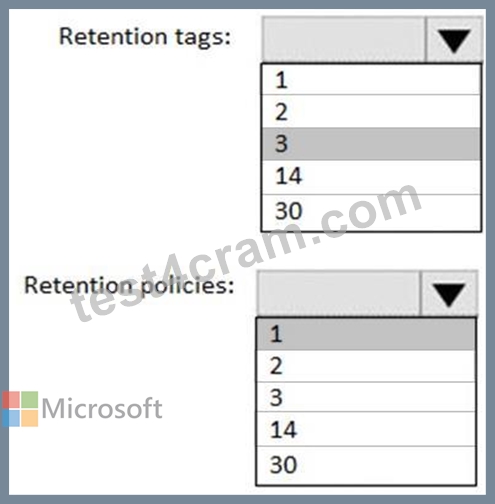
NEW QUESTION 97
You need to configure the required objects for the branch office administrators.
What should you create for each administrator?
- A. a management role and a management role assignment policy
- B. a management role scope and a management role group
- C. a management role scope and a management role assignment
- D. a management role assignment policy and a management role group
Answer: B
Explanation:
Reference:
https://practical365.com/exchange-server/exchange-server-role-based-access-control-in-action/
Topic 3, Fabrikam, Inc
Existing Environment
Network Environment
The on-premises network of Fabrikam contains an Active Directory domain named fabrikam.com.
Fabrikam has a Microsoft 365 tenant named fabrikam.com. All users have Microsoft 365 Enterprise E5 licenses.
User accounts sync between Active Directory Domain Services (AD DS) and the Microsoft 365 tenant.
Fabrikam.com contains the users and devices shown in the following table.
Fabrikam currently leases mobile devices from several mobile operators.
Microsoft Exchange Online Environment
All users are assigned an Outlook Web App policy named FilesPolicy.
In-Place Archiving is disabled for Exchange Online.
You have the users shown in the following table.
User1 and User3 use Microsoft Outlook for iOS and Android to access email from their mobile device. User2 uses a native Android email app.
A Safe Links policy in Microsoft Defender for Office 365 is applied to the fabrikam.com tenant. The marketing department uses a mail-enabled public folder named FabrikamProject.
Default MRM Policy is disabled for the fabrikam.com tenant.
Problem Statements
Fabrikam identifies the following issues:
Users report that they receive phishing emails containing embedded links.
Users download and save ASPX files when they use Outlook on the web.
Email between Fabrikam and Litware is unencrypted during transit.
User2 reports that he lost his mobile device.
Requirements
Planned Changes
Fabrikam plans to implement the following changes:
Configure FilesPolicy to prevent Outlook on the web users from downloading attachments that have the ASPX extension.
Purchase a new smartboard and configure the smartboard as a booking resource in Exchange Online.
Ensure that the new smartboard can only be booked for a maximum of one hour.
Allow only Admin1 to accept or deny booking requests for the new smartboard.
Standardize mobile device costs by moving to a single mobile device operator.
Migrate the FabrikamProject public folder to Microsoft SharePoint Online.
Enable In-Place Archiving for users in the marketing department.
Encrypt all email between Fabrikam and Litware.
Technical Requirements
Fabrikam identifies the following technical requirements:
Ensure that the planned Sharepoint site for FabrikamProject only contains content that was created during the last 12 months.
Any existing file types that are currently configured as blocked or allowed in the FilesPolicy policy must remain intact.
When users leave the company, remove their licenses and ensure that their mailbox is accessible to Admin1 and Admin2.
Generate a report that identifies mobile devices and the mobile device operator of each device.
Use the principle of least privilege.
Minimize administrative effort.
Retention Requirements
Fabrikam identifies the following retention requirements for all users:
Enable users to tag items for deletion after one year.
Enable users to tag items for deletion after two years.
Enable users to tag items to be archived after one year.
Automatically delete items in the Junk Email folder after 30 days.
Automatically delete items in the Sent Items folder after 300 days.
Ensure that any items without a retention tag are moved to the Archive mailbox two years after they were created and permanently deleted seven years after they were created.
NEW QUESTION 98
Note: This question is part of a series of questions that present the same scenario. Each question in the series contains a unique solution that might meet the stated goals. Some question sets might have more than one correct solution, while others might not have a correct solution.
After you answer a question in this section, you will NOT be able to return to it. As a result, these questions will not appear in the review screen.
Your company has a Microsoft Exchange Server 2019 hybrid deployment that contains two Mailbox servers named MBX1 and MBX2.
The company has the departments shown in the following table.
From the on-premises organization, outbound email is sent directly to the Internet by using DNS lookups.
You are informed that some sales department users send email messages that are identified as spam.
You need to automatically block the sales department users from repeatedly sending spam.
Solution: You migrate all the mailboxes of the sales department to Exchange Online.
Does this meet the goal?
- A. yes
- B. No
Answer: A
Explanation:
Exchange Online Protection (EOP) will scan outbound messages from Exchange Online mailboxes.
NEW QUESTION 99
You must prevent HelpDeskUser1 from repeating the same mistake.
You need to identify which management role provided HelpDeskUser1 with the necessary permissions to make the mistake identified in the problem statement.
Which two cmdlets should you run? Each correct answer presents part of the solution.
- A. Get-ManagementRole
- B. Get-ManagementRoleEntry
- C. Get-RoleGroupMember
- D. Get-RoleGroup
- E. Get-ManagementRoleAssignment
Answer: B,E
Explanation:
Reference:
https://docs.microsoft.com/en-us/powershell/exchange/find-exchange-cmdlet-permissions?view=exchange-ps
NEW QUESTION 100
Your company has an Exchange Online tenant.
A partner company named Fourth Coffee also uses Exchange Online.
You need to ensure that the users at your company share free busy information with the users at Fourth Coffee. The solution must ensure that the meeting details included in the calendars of your company users remain hidden from the Fourth Coffee users.
How should you complete the command? To answer, select the appropriate options in the answer area.
NOTE: Each correct selection is worth one point.
Answer:
Explanation:
Reference:
https://docs.microsoft.com/en-us/powershell/module/exchange/new-organizationrelationship?view=exchange-ps
NEW QUESTION 101
You have a Microsoft Exchange Online subscription.
You run the following command.
Set-ActiveSyncOrganizationSettings -DefaultAccessLevel Block
You run Get-ActiveSyncDeviceAccessRule | f1 Identity, AccessLevel, Characteristic, QueryString and you receive the following output.
For each of the following statements, select Yes if the statement is true. Otherwise, select No.
NOTE: Each correct selection is worth one point.
Answer:
Explanation: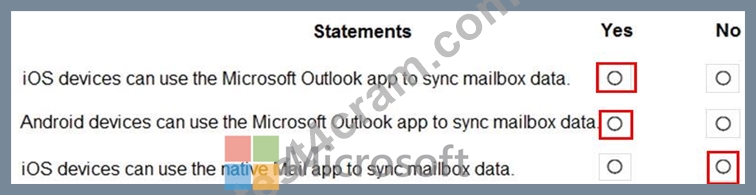
NEW QUESTION 102
Your company has a Microsoft Exchange Server 2019 hybrid deployment.
The company has four departments that have the mailboxes shown in the following table.
The mailboxes are configured as shown in the following table.
You have two administrators named Admin1 and Admin2 that are assigned the permissions shown in the following table.
For each of the following statement, select yes if the statement is true. otherwise, select No.
NOTE: Each correct selection is worth one point.
Answer:
Explanation:
Explanation:
References:
https://docs.microsoft.com/en-us/exchange/discovery-management-exchange-2013-help
https://docs.microsoft.com/en-us/powershell/module/exchange/mailboxes/search-mailbox?view=exchange-ps
NEW QUESTION 103
You have a Microsoft Exchange Server 2019 hybrid deployment.
You use Advanced Threat Protection (ATP).
You have safe attachments policies configured as shown in the following table.
You have the users shown in the following table.
For each of the following statements, select Yes if the statement is true. Otherwise, select No.
NOTE: Each correct selection is worth one point.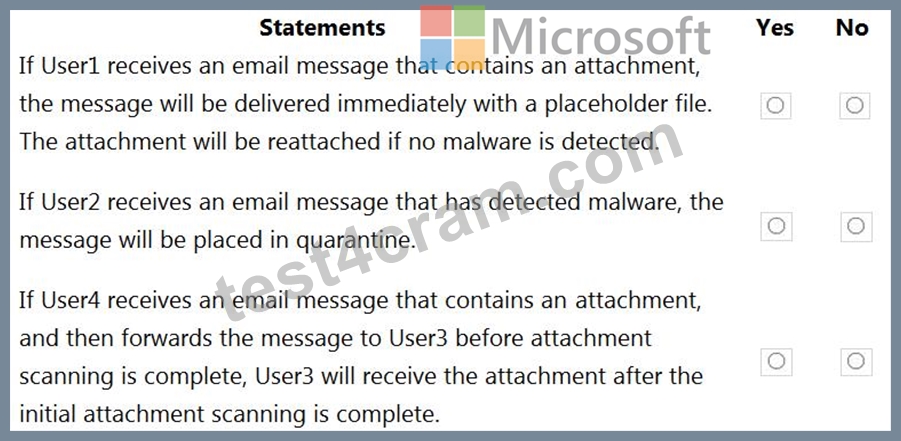
Answer:
Explanation:
Explanation:
Box 1: No
Dynamic Delivery cannot make changes to on-premise mailboxes after the message has been delivered.
Box 2: Yes
Policy2 applies to User2. Policy2 has a block action so the message will be placed in quarantine.
Box 3: No
User3 does not have a policy assigned so the attachment will be forwarded without being scanned.
Reference:
https://docs.microsoft.com/en-us/microsoft-365/security/office-365-security/atp-safe-attachments?view=o365-worldwide
https://docs.microsoft.com/en-us/microsoft-365/security/office-365-security/atp-safe-attachments?view=o365-worldwide#dynamic-delivery-in-safe-attachments-policies
NEW QUESTION 104
You have a Microsoft Exchange Online subscription that uses a namespace of litwareinc.com.
You create a connector in Exchange Online that is configured as shown in the following exhibit.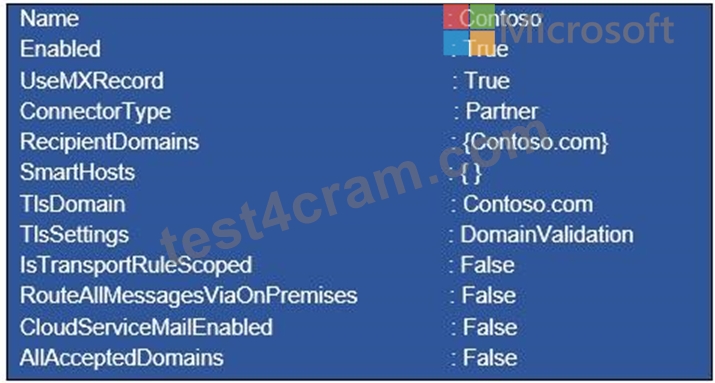
Use the drop-down menus to select the answer choice that completes each statement based on the information presented in the graphic.
NOTE: Each correct selection is worth one point.
Answer:
Explanation:
NEW QUESTION 105
Note: This question is part of a series of questions that present the same scenario. Each question in the series contains a unique solution that might meet the stated goals. Some question sets might have more than one correct solution, while others might not have a correct solution.
After you answer a question in this section, you will NOT be able to return to it. As a result, these questions will not appear in the review screen.
You have a Microsoft Exchange Online tenant that contains the following email domains:
Adatum.com
Contoso.com
Fabrikam.com
When external recipients receive email messages from the users in the tenant, all the messages are delivered by using the @contoso.com email domain.
You need to ensure that the users send email by using the @fabrikam.com email domain.
Solution: From the Microsoft 365 portal, you set fabrikam.com as the default domain.
Does this meet the goal?
- A. No
- B. Yes
Answer: B
Explanation:
Reference:
https://docs.microsoft.com/en-us/microsoft-365/admin/setup/domains-faq?view=o365-worldwide#how-do-i-set-or-change-the-default-domain-in-microsoft-365
NEW QUESTION 106
You have a Microsoft Exchange Online tenant.
You enable hierarchical address books (HABs).
You create a new distribution group named Contoso.
You need to configure the Contoso group as the root of the hierarchy. The members of the group must appear in the hierarchy.
How should you complete the PowerShell commands?
Answer:
Explanation:
NEW QUESTION 107
......
MS-203 Exam Dumps Pass with Updated 2022 Certified Exam Questions: https://www.test4cram.com/MS-203_real-exam-dumps.html
Guide (New 2022) Actual Microsoft MS-203 Exam Questions: https://drive.google.com/open?id=1obXZKgqVtWXzqbFxtwk-IO8xHwNvgcfw